
Menu
The spelling mistakes, awkward wording, and obvious red flags people were once trained to watch for are disappearing. Today’s phishing emails can be polished, professional, personalized, and surprisingly convincing.
That means businesses need to change how employees evaluate suspicious messages. Instead of asking whether an email looks legitimate, the better question is whether the request itself is expected, appropriate, and independently verifiable.
For years, cybersecurity awareness training taught employees to look for familiar signs of a phishing email.
Bad spelling. Strange grammar. Awkward greetings. Odd sentence structure. Messages that simply didn’t sound like something a real business would send.
Those warning signs are still worth watching for, but they are becoming much less reliable.
Generative AI can produce clear, professional business communications in seconds. The same technology that helps legitimate employees write emails, proposals, reports, and customer communications can also help criminals create more believable phishing messages.
An attacker no longer needs to be a good writer to create a convincing email.
And that changes the way businesses need to think about phishing.
Think about the phishing emails most people remember from years ago.
A message claiming to come from a bank might contain obvious spelling mistakes. An email supposedly from a company president might use unusual language. A fake invoice might have poor formatting, strange capitalization, or sentences that clearly did not sound professional.
Those mistakes made phishing easier to recognize.
Employees were commonly taught to watch for:
The problem is that AI can eliminate many of those mistakes instantly.
A cybercriminal can ask an AI system to rewrite a message until it sounds professional, friendly, urgent, reassuring, or authoritative.
The result can look like a perfectly ordinary business email.
Imagine someone wants to impersonate a member of your accounting department.
Instead of trying to write a convincing message themselves, they can use AI to create one.
They might ask for an email that sounds:
They can then revise the message repeatedly until it sounds natural.
AI can also help attackers tailor emails to different situations, such as invoices, payroll, password resets, document sharing, banking changes, shipping notices, or requests from management.
The quality of the writing is no longer a reliable indication that the message is legitimate.
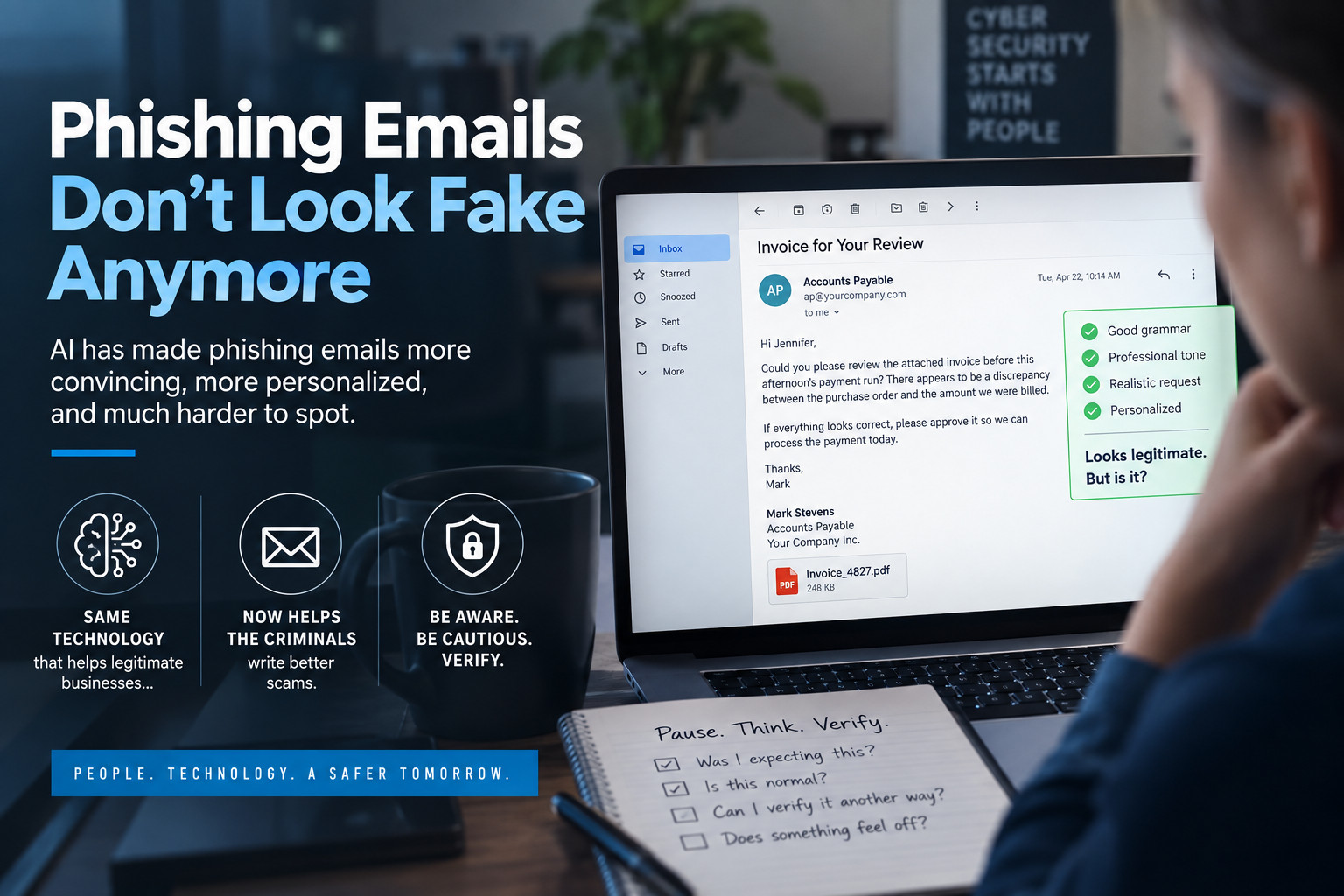
Consider a message like this:
Hi Jennifer,
Could you please review the attached invoice before this afternoon’s payment run? There appears to be a discrepancy between the purchase order and the amount we were billed.
If everything looks correct, please approve it so we can process the payment today.
Thanks,
Mark
Nothing about that message immediately screams phishing.
The grammar is correct.
The tone is professional.
The request sounds reasonable.
If the attacker has done some basic research, the names, job titles, suppliers, projects, or terminology could even be accurate.
The important question is no longer simply:
Does this email look suspicious?
A much better question is:
Is this request expected, normal, and verifiable?
As phishing messages become more polished, employees need to focus less on writing quality and more on the action being requested.
Certain requests deserve additional scrutiny, regardless of how professional the email looks.
An email tells you that your Microsoft 365, Google, banking, payroll, or another account needs immediate attention.
Rather than clicking the link in the message, open the service through your normal bookmark, application, or known website.
A supplier suddenly asks you to send future payments to a different bank account.
That request should always be verified using a trusted contact method you already have on file.
Do not rely on the phone number or contact information contained in the email requesting the change.
A message supposedly from an executive asks you to send a wire transfer, purchase gift cards, or make an unusual payment immediately.
Urgency is a powerful social-engineering technique because it encourages people to act before they have time to think.
Stop and verify the request.
Invoices, PDFs, shared files, cloud-storage links, electronic signature requests, and online documents can all be used as phishing lures.
Ask yourself whether you were actually expecting the document and whether the sender normally communicates with you that way.
Be particularly cautious when a message involves passwords, multifactor authentication codes, account recovery information, or security verification.
A professional-looking email does not make the request safe.
Generic phishing emails are relatively easy to ignore.
A message that includes your company name, your job title, your boss’s name, a supplier you work with, or a current project can be much more convincing.
Attackers can gather a surprising amount of information from publicly available sources, including:
AI can help turn that information into highly personalized messages quickly and at scale.
An email that appears to understand your organization is naturally more likely to earn someone’s trust.
That makes targeted phishing easier for criminals to produce and harder for employees to identify.
Employees remain an important part of a company’s cybersecurity defences, but businesses should not expect people to identify every sophisticated phishing message manually.
Email security needs multiple layers of protection.
Depending on the organization’s technology environment, those protections may include:
No single security control will stop every attack.
The strongest approach combines technology, employee awareness, sensible business procedures, and rapid response when something suspicious occurs.
Sometimes one of the most effective cybersecurity controls is also one of the simplest.
Verify unusual requests using another communication method.
If your boss emails asking for an unexpected payment, call them.
If a supplier changes its banking information, confirm the change using a phone number you already have.
If someone sends you an unexpected document, contact them separately before opening it.
If an account says you need to sign in immediately, open the application or website directly instead of following the email link.
Be especially cautious when an email involves:
A brief verification can prevent a very expensive mistake.
Security awareness training can no longer stop at:
“Look for spelling mistakes.”
Employees need to understand that a modern phishing email may be perfectly written.
Training should increasingly focus on recognizing suspicious requests and unusual behaviour.
Employees should learn to ask:
Those questions are becoming far more valuable than relying on grammar alone.
Artificial intelligence is helping businesses become more productive.
Unfortunately, criminals have access to the same technology.
Today’s phishing email may be polished, professional, personalized, and grammatically perfect.
It may mention the right people.
It may use the right terminology.
It may sound exactly like something your boss, supplier, bank, or coworker would send.
That means our habits need to evolve.
Don’t trust an email simply because it looks professional. Verify what it is asking you to do.
Businesses that combine strong email security, multifactor authentication, employee training, and reliable verification procedures will be in a much better position to deal with the next generation of phishing attacks.
Because in the age of AI, the phishing email you need to worry about most may be the one that doesn’t look fake at all.